Admin Panel
The /admin web panel is an alternative interface for the support team. Managers work in a browser instead of a Telegram group. Built on Filament 3.
Access
Panel URL: https://<your-domain>/admin
Login requires an account from the users table.
Create a new user via artisan:
docker exec pet php artisan app:create-admin-userPanel Sections
Conversations
Route: /admin/conversations
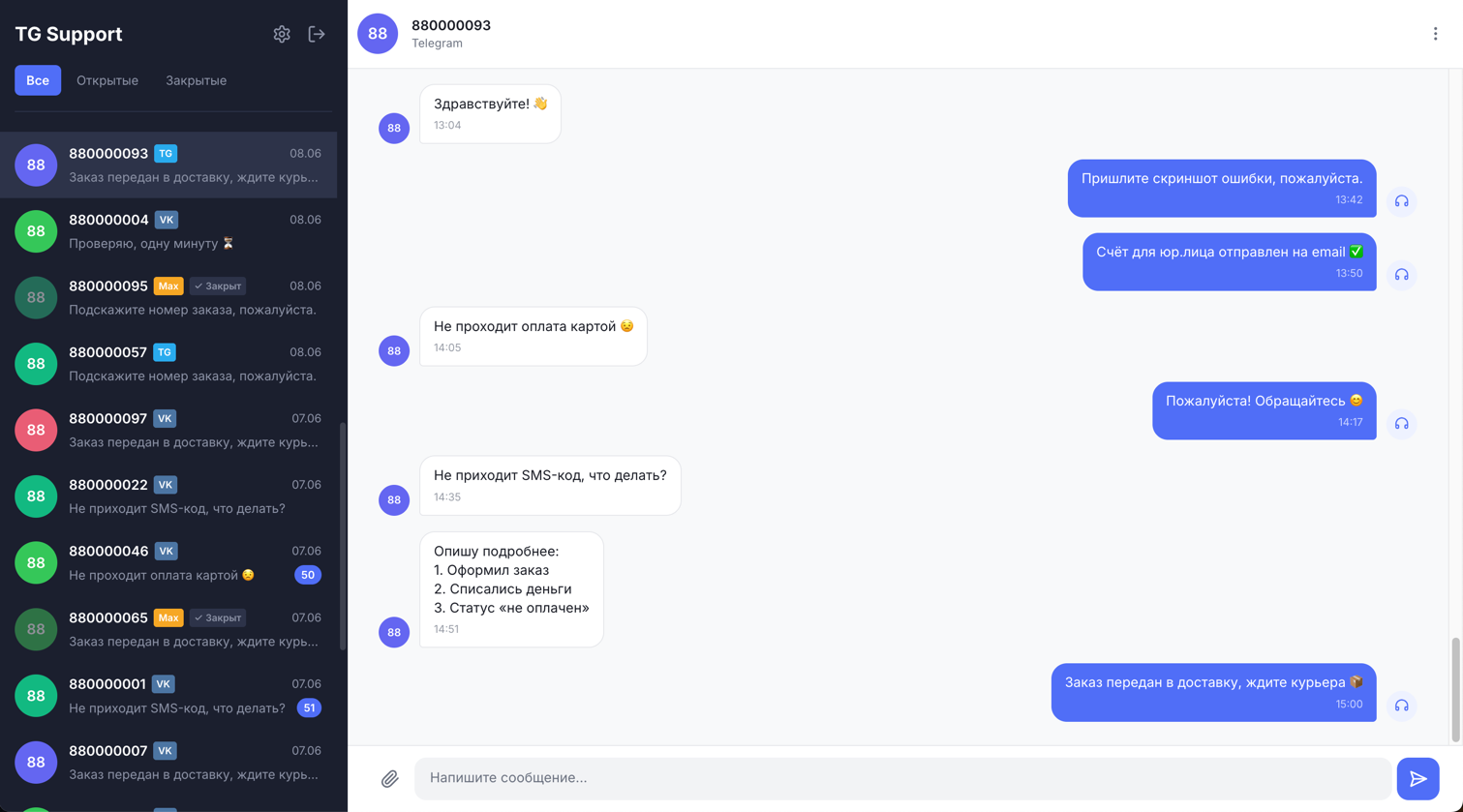
The main section for handling support requests. Displays a list of all users who have messaged the bot.
| Column | Description |
|---|---|
| Chat ID | User identifier on their platform |
| Platform | telegram, vk, or an external source |
| Last Message | Date and time of the last message |
Filters: by platform (telegram / vk). Default sort: by update date, newest first.
Conversation Page
Shows the message history with a specific user. Incoming and outgoing messages are displayed in chronological order.
In admin_panel mode, a reply form is available. To send a reply:
- Enter text in the «Message» field.
- Click the send button.
- The reply is saved to the database and delivered to the user via the queue.
TIP
The reply form is hidden when the panel is opened in telegram_group mode.
Bot Users
Route: /admin/bot-users
A list of all registered bot users with the ability to block them.
| Action | Description |
|---|---|
| Block | Sets is_banned = true. The user receives a ban notification instead of a reply |
| Unblock | Removes the ban (is_banned = false) |
External Sources
Route: /admin/external-sources
INFO
This section is only available to administrators (role = admin).
Manage external sources integrated via REST API.
To create a source:
- Click «New External Source».
- Enter a name and (optionally) a «Webhook URL» — the address where replies will be delivered.
- Save — an access token is generated automatically.
WARNING
When saving an existing source, the token is regenerated automatically. Any integrations using the old token will stop working — update the token on the client side.
To retrieve the current token for a source:
docker exec pet php artisan tinker --execute="echo \App\Models\ExternalSource::find(1)->accessToken->token;"Users
Route: /admin/users (under the «Settings» group)
INFO
This section is only available to administrators (role = admin).
Manage login accounts for /admin.
| Role | Access |
|---|---|
manager | Conversations, Bot Users |
admin | Everything, including Users and External Sources |
To create a user via the panel:
- Go to «Settings → Users».
- Click «New User».
- Fill in the name, email, password (minimum 8 characters), and role.
To create a user via artisan:
docker exec pet php artisan app:create-admin-userTIP
The command creates a user with the default role. The role can be changed in the panel.
Behavior in Different Modes
| Feature | admin_panel | telegram_group |
|---|---|---|
View messages in /admin | Yes | Yes (read-only) |
Reply form in /admin | Yes | Hidden |
| Create forum topics in Telegram | No | Yes |
| New messages saved to DB | Yes | Yes |
FAQ
I don't see the reply form.
Make sure MANAGER_INTERFACE=admin_panel is set in .env and the container has been restarted. To verify the current value:
docker exec pet php artisan tinker --execute="echo config('app.manager_interface');"New messages are not appearing.
The page refreshes every 5 seconds. If messages still do not appear after 10 or more seconds, check whether the queue is running:
docker compose psA blocked user is still able to write.
When a user is blocked via the panel, the ban notification is sent through the queue. Make sure the worker is running.